Demo ready
Overview and Setup
A polished entry point that explains what PIM for Outlook is, where it runs, and how the add-in is launched and authenticated.
A curated demo of how a traditional user guide can be reshaped into a cleaner Docusaurus experience with stronger navigation, guided workflows, reusable MDX patterns, and richer screenshot presentation.
This product page uses a curated slice of the PIM for Outlook user guide to show how imported content can be turned into a cleaner online help experience without losing the underlying guidance.
A polished entry point that explains what PIM for Outlook is, where it runs, and how the add-in is launched and authenticated.
Task-based guidance for composing, publishing, replying, forwarding, and searching for messages without leaving Outlook.
Structured reference content for suggested locations, attachments, contact selection, and the current known limitations.
PIM for Outlook is strongest when the interface, publishing context, and reference guidance all stay close together. This kind of product-home page gives users a clearer route into that workflow.
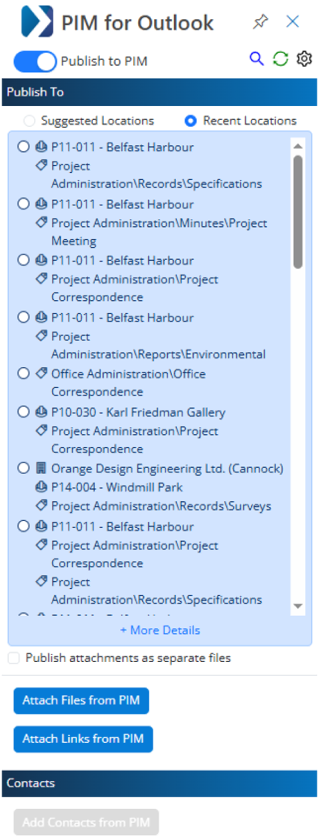
The publish pane is the anchor for the user guide: suggested locations, recent locations, settings, and publish actions all sit in one side-panel experience.